
Tuesday, March 26, 2013

Saturday, March 9, 2013
EDLD 5326 Research Project Update
AR
Project Summary :
I have been implementing a paperless classroom
ever since my students all received their district issued iPads. The Action
Research would be performed during the 3rd six-week and ended
January 14th at the end of the 6 weeks. I have compiled the data
which consisted of a copy count from the 2nd six-weeks to compare
the third six-week once we began using the iPads. I was able to cut my usage
from 6,600 copies made the 2nd six-week to 5,150 copies the 3rd
six-weeks. This is even lower than the proposed 5,280. On the downside I have
noticed that the students are getting into more trouble, even at home, since
the iPads have arrived. I have also noticed that the Accelerated Reading points
have decreased. I have had to go back to making sure that my students are reading
a real book and not rely on them reading in their iPads because they are too
easily distracted with the ease of switching from their book to some other game
or app. Also, I have to do double the work to get things done on the iPad. If I
want the students to do their homework I have to scan a copy of the document,
save it a pdf and send it to their iPads. I can see how teachers get frustrated
and find it be easier to just simply make a copy for them. And recently with
the new update to the iPads the iMessage feature is not working so I cannot
send any photos or pdf’s to them. Another drawback is that there are not enough
resources yet for use on the iPad. The student textbooks are not capable of
being used, the workbooks are not available and the apps are limited,
especially since my students are low income and are not capable of purchasing
apps that are the full version. I know this is a great idea in theory but I am
seeing a few things that are making the transformation difficult.
Monday, December 3, 2012
EDLD 5397 - Research
Draft Action Research Project Progress Report
a.
Title – Provide a clear,
brief title that describes your Action Research Project. This title should
describe what you are trying to find out, not what you think you will
find. (5 points)
a.
Paperless Classroom – is it possible?
b.
Needs Assessment – Indicate how the need
for an improvement was determined. Note the data collected to support the need.
Present the data in a disaggregated manner in terms of ethnicity, and gender.
(5 points)
a.
The
need for going paperless stems from
i. The cost of paper to the campus – data
being collected includes number of copies made in the 2nd 6 weeks
compared to 3rd 6 weeks after iPad distribution in my classroom
ii. The technology being provided by the
district to all students i.e. iPads 1-12 and iPods pk-k
iii. Worksheet vs. technology review
iv. eClassroom information vs. paper
newsletters
c.
Objectives and Vision
of the action research project. (ELCC 1.1) – After completing the needs assessment,
develop a vision relating to the improvement needed and develop an action
research project that includes measureable objectives in terms of expected
results. (5 points)
a.
The vision
of the research project is to see how much paper on classroom can save by using
district issued technology. The objectives can be measured using copy count and
cost when compared before and after the iPad distribution. I expect to see a
great cut in the amount of paper/copies being used and the value added to
students who learn better through technology than through worksheets.
d.
Review of the
Literature and Action Research Strategy – Apply Best Practice to Student Learning
(LCC 2.3) – Review recent literature related to the topic of your research
project. The research should support why your action research plan would be
described as a best practice or possible solution to improving achievement or
culture. The review of the literature should be written in APA style with a
reference page listing the sources. Explain the decision making process for
implementing the action research project. Who was involved? What was
considered? What decisions were made? (5 points)
a.
e.
Articulate the Vision
(ELCC 1.2) – Describe
how you communicated the vision of the action research project to staff,
parents, students, and community members. (5 points)
f. The vision was discussed with my mentor at
the end of last year. Once this year began I began talking to the parents in my
classroom about how I was going to be moving to a more “green” classroom as the
year progressed and the iPads were distributed. I began this move by stopping
paper newsletters and moving to using my eClassroom as well as email and
texting for any announcements that the parents needed to be aware of. I also
placed my newsletter in PDF form on the eClassroom. As the school year
progresses there will be continued conversations with the parents of my
students as well as the rest of my grade level and administration as I begin to
move from making copies to working on the iPads. I intend on holding a parent
meeting to completely “kick-off” the project once a majority of many students
have their iPads. My administration and mentor are kept up to date through
mentor meetings, and at this point it is all about the plan and implementation
as the iPads are not distributed yet. The school secretary is helping me by
keeping me informed of the amount of copies I am making each 6 weeks so I have
data to compare. I have also placed information on my eClassroom for any
parents or community members who may be interested.
g.
Manage the
organization (ELCC 3.1) – Describe the strategy used for organizing the
implementation of the project noting responsibilities given to self and others
and how you managed any monies, time, materials, and people. Give examples of
how you put a priority on student learning and safety. (5 points)
a.
The
organization of the plan really revolves around my copy count and the iPad
distribution. This is a structured strategy because the district decides when
my 4th graders will be getting the iPads and the copies I make are
being counted automatically. I do not require any money, but I am asking the
campus secretary to assist me by keeping my copy count. Once I begin switching
to the iPads I can calculate the cost of the paper used against the six weeks
that I will be comparing. I have not had to manage any other aspects; I am for
the most part, waiting for the district to issue the iPads.
h.
Manage Operations
(ELCC 3.2) – Describe
the strategy used to lead the operations of the project and set priorities.
Include a brief description of how you used the needs assessment, data, group
process skills, built consensus, communicated, and resolved conflict. (5
points)
a.
In
order to lead the operations, I simply held a meeting with my mentor, my
principal and the campus secretary in order to begin gathering information
needed to keep a copy count. The priorities I set revolved around the iPad
distribution for the school/grade level. I discussed my idea and the needs of
cutting the paper cost down for the campus. Most of the money allocated for
supplies goes to paper. A consensus was met when we realized how much the iPads
could help cut the need for worksheets and meet the needs of the digital
natives in our school, namely my classroom.
i.
Respond to Community
Interest and Needs (ELCC 4.2) – Describe how the action research project will serve
the needs of students with special and exceptional needs and students with
diverse backgrounds (cultural, ethnic, economic, or special interest groups)
Elaborate on methods used to address any specific needs of the school or
community. (5 points)
a.
This
project is very important and extremely helpful to students with exceptional
needs and diverse backgrounds. We have already seen how the iPads help our
special populations as they were given the iPads last year on a trial basis. It
turns out that they are blossoming with the help of the iPads and are gaining
more knowledge by using the iPads for their work. The district took care of
this for me by deciding to pass out iPads to special populations last year.
Once I found out these students were beginning to use the iPads I asked out
Resource teacher to keep me informed of how the iPads have helped these
students. We have seen growth and understanding gained faster with the help of
the iPads compared to not using them.
Sunday, November 4, 2012
Wednesday, September 19, 2012
5364 - Week 4 Part 1
The quote that got may
attention in this week’s reading was: “To be prepared for the fast-paced,
virtual workplace that they will inherit, today’s students need to be able to
learn and produce cooperatively” (Pitler, Hubbell, Kuhn & Malenoski,
2007). Working cooperatively is something that I am constantly trying to
improve in my 4th grade class. The students are learning to be good
group members and tot trust each other as a group, believing that the work will
get done and done well. As the students continue in their education, as well as
entering the work force, they have no choice but to be a team player and work
with people. It is a little bit of a challenge for some students and others
seem to do well with it as some like working together while others prefer to
work alone. It is a skill that must be practiced and rehearsed in order to
learn to do it well. Personally I do not like group work because my past experiences
have left me feeling like I am carrying my group and that I do most of the work
while others skate by on my grade however, I have found that the groups at
Lamar University have all had professionals in them who do their part, a
welcome change.
Monday, September 10, 2012
5364 - Week 3 Part 3
Week 3 Part 3
Creating a book using the Book Builder was not difficult. I felt like I could have added a lot more content and made a much more interesting book that would allow students to feel like they are learning The Writing Process, if only I had more time. I am encouraged to see how easy it was to make and that there are so many more features that I could have used and built a great book with. In the future I could see using this to make learning easier for some students, and even allowing students to build books for each other. I think a place like this has a lot of potential and I would like to have more time to use it, maybe after I graduate....
5364 - Week 3 Part 1
Week 3 Part 1
In the weeks past we have had some terrific readings and videos to watch, this week is not different. The reading consisted of:
- “Teaching Every Student in the Digital Age: Universal Design for Learning”
- “Center for Applied Special Technology: UDL Book Builder”
- “Center for Applied Special Technology: Model UDL Lessons”
- “Web 2.0: New Tools, New Schools”
- “Using Technology with Classroom Instruction That Works”
In the reading "Using Technology With Classroom Instruction That Works", the quote that stuck out to me was "we cannot overemphasize the wisdom of using rubrics to provide feedback on student attainment of the objectives set. Because rubrics provide detailed descriptions, they help teachers meet the classroom recommendation of giving feedback that’s specific to a criterion as opposed to giving a simple grade or score.” (Pitler, Hubbell, Kuhn & Malenoski, 2007). Makes so much sense. Without the detailed descriptions that are provided by rubrics, a lot of students will be asking a lot more questions that the rubrics could simply answer. Also, students will know exactly what is expected of them and exactly what the grading will look like. Students, especially in the 4th grade, are learning to become more independent and require guidelines to follow. If they have a rubric to which they can refer, they will be able to know where to look, what to do and this enables them to begin to build their independence. I have learned that using rubrics could be a great thing to implement and in the future I think more teachers just may use them, even in lower grades.
Pitler, H., Hubbell, E., Kuhn, M., & Malenoski, K. (2007). Using technology with classroom instruction that works. Alexandria, VA: Association for Supervision and Curriculum Development, 41-58, 217-225.
Wednesday, September 5, 2012
5364 - Web Conference #2
The web conference started a little rocky, the sound was not working. I thought it was me at first but the rest of the class stated that they could not hear either so Dr. Borel took a "Time Out" to try to fix it. She got sound to us but we had a bad feed back so she worked on it some more. The conference began with a slight echo so Dr. Borel ended up typing as well as talking to us. Dr. Borel told us to check the setting of our email on Blackboard in order to not have to check our MyLamar email. She asked us about what we knew as far as the main google site, the field supervisor.
She then went on about this weeks assignment. She asked if there were any questions. We were still having trouble so she tried another computer to see if it was any better. She was not too happy and stated that this was the worse web conference she had ever done. I think we all understand, things happen and sometimes they are just out of our control.
We ended up doing it through chat since the sound did not work. It was a little confusing and Dr. Borel tried really hard to answer questions. I ended up turning off my camera and speakers and just reading what was going on, I left soon after that. Dr. B apologized but you know how it it...stuff happens.
She then went on about this weeks assignment. She asked if there were any questions. We were still having trouble so she tried another computer to see if it was any better. She was not too happy and stated that this was the worse web conference she had ever done. I think we all understand, things happen and sometimes they are just out of our control.
We ended up doing it through chat since the sound did not work. It was a little confusing and Dr. Borel tried really hard to answer questions. I ended up turning off my camera and speakers and just reading what was going on, I left soon after that. Dr. B apologized but you know how it it...stuff happens.
Tuesday, September 4, 2012
5364 - Week 2 Reflection
Week 2 also brought with it some wonderful reading and videos.
- "Using Technology With Classroom Instruction That Works"
- "Technology-Enriched Classrooms: Effects on Students of Low Socioeconomic Status”
- “The Impact of Education Technology on Student Achievement: What the Most Recent Research Tells Us”
- “Teaching Every Student in the Digital Age: Universal Design for Learning”
I found most of the reading interesting and full of great ideas as well as things to think about. I really liked the article "Teaching every student in the digital age: Universal design for learning" by Rose and Meyer.
This article, as well as many others, brings to light the fact that there are so many chances for students to learn with technology. Technology can be used to focus in on the different learning styles and learning disabilities that inhibit learning in some students. Using different kinds of media, to either use in initial teach or student created, can only help support what is being taught in a classroom. I know that we are all looking into the future and expecting student to have more access and more experience with technology, so it is up to us to be able to offer what is needed and use it to our/their advantage. We can’t’ stop it so, as they say, if you can’t beat it, join it! I guess that would be a great reason many of us are getting our Master’s in Educational Technology, to join them.
Rose, D., & Meyer, A. (2002). Teaching every student in the digital age: Universal design for learning. Alexandria, VA: Association for Supervision and Curriculum Development. Available online at the Center for Applied Special Technology Web site. Chapter 1. Retrieved from http://www.cast.org/teachingeverystudent/ideas/tes/
Thursday, August 30, 2012
5364 - Week 1 Reflection
WEEK 1 Part 1
During week one we had many readings to sort through.
- "Using Technology with Classroom Instruction That Works"
- "Learning as a Personal Event: A Brief Introduction to Constructivism"
- "How People Learn: Brain, Mind, Experience, and School"
- "Social Networking Technologies in Education"
- "If I Teach This Way, Am I Doing My Job: Constructivism in the Classroom"
- "Web 2.0: New Tools, New Schools"
One of the best reading was the one titled "Learning as a Personal Event: A Brief Introduction to Constructivism". I liked this one because it allows students to be more involved with their learning. It shows how students in a Learner-Centered classroom benefit more and participate more in the learning. The students are going out and about to gather information instead of filling out worksheets and watching videos. the Learner-Centered classroom gives students the chance to get their hands on real situations instead of simply listening and watching.
Another article, "How People Learn: Brain, Mind, Experience, and School, pp. 194-218" continues to discuss the way students learn suing technology. this article is different and helpful because it not only talks about the good of technology, but also points out things that need to be considered when adding technology to a classroom, namely how people can use technology to learn by doing. Technology provides receive feedback, and helps students sharpen their skills while helping them learn.
Citation: Bransford, J. D., Brown, A. L., & Cocking, R. R. (2000). How people learn: Brain, mind, experience, and school(Expanded edition). Ch. 9, pp. 194-218. Washington, D.C.: National Academy Press. Retrieved from http://www.nap.edu/openbook.php?record_id=9853&page=206
Southwest Educational Development Laboratory, (1999). Learning as a personal event: A brief introduction to constructivism. Retrieved from http://www.sedl.org/pubs/tec26/intro2c.html
5364 - Web Conference #1
When the web conference began Dr. Borel thanked the class for being patient as we all transfer from EPIC to BlackBoard. She mentioned that the discussion board has been a little messed up and that everyone will get credit for the discussion this week.
Next she went through some areas of Blackboard and how to find information about submitting assignment. She let us know that there are videos to help us out, and talked to us about making sure we check that the assignment actually gets sent. She then went on to explain how the announcements will go to our email and that we could change the email in order to have announcements sent to an email of our choice. This way we are guaranteed to get the announcements as she puts them up.
Next she reminded us that all assignments are due on Sundays and made sure all students have information on how to go to the educational leadership google site that is set up for each course.
Next she went thorough the field supervisor requirements and who to contact if we have not heard from our FS. She also went through forms that we are required to have in order to graduate and that information is in the handbook.
Next she went through the week's assignment and what is expected from us, mainly the expectations from our group project. We have a lot of work to do, but together we can get it all accomplished.
Next she went through some areas of Blackboard and how to find information about submitting assignment. She let us know that there are videos to help us out, and talked to us about making sure we check that the assignment actually gets sent. She then went on to explain how the announcements will go to our email and that we could change the email in order to have announcements sent to an email of our choice. This way we are guaranteed to get the announcements as she puts them up.
Next she reminded us that all assignments are due on Sundays and made sure all students have information on how to go to the educational leadership google site that is set up for each course.
Next she went thorough the field supervisor requirements and who to contact if we have not heard from our FS. She also went through forms that we are required to have in order to graduate and that information is in the handbook.
Next she went through the week's assignment and what is expected from us, mainly the expectations from our group project. We have a lot of work to do, but together we can get it all accomplished.
Wednesday, August 1, 2012
5366 - Web Conference #3
I was not able to attend the web conference this evening but I watched the video. Dr. Cummings again asked us if there were any questions pertaining to the week 3 assignment. One student asked if we needed to add music to our animation and Dr. Cummings stated that we didn't have to, but we could if we wanted.
Next she asked us if we wanted to add something about where we are on the animation. No one added anything but a question about the tutorial for the website came up and she clarified who the audience would be. The answer is to just make it pertain to who we want to teach it to, mainly teachers and students. She also wants us to learn the software so we can use it in our classrooms.She also made sure we had the movement of the animation be at least 10 movements. Some students shared what other software they were using and Dr. Cummings asked if it was something that should be added to the course in the future, she will add it to the next course.
Next she asked if there were any questions about the website. She clarified that the website would be for a school setting because it addresses teachers, Parents, students and community. As questions were asked, they were answered and she made things a lot clearer for students that were uncertain.
Next she discussed the course embedded documents and is going to send them as an announcement for those of us that do not have them or are unclear about them. She also discussed the EdTech wiki and clarified that the forms must say ET for EdTech.
Also, we need to show our collaboration for this project on a google doc. We have not actually done this so I will cut/paste our collaboration so they can see what we have done.
Next she asked us if we wanted to add something about where we are on the animation. No one added anything but a question about the tutorial for the website came up and she clarified who the audience would be. The answer is to just make it pertain to who we want to teach it to, mainly teachers and students. She also wants us to learn the software so we can use it in our classrooms.She also made sure we had the movement of the animation be at least 10 movements. Some students shared what other software they were using and Dr. Cummings asked if it was something that should be added to the course in the future, she will add it to the next course.
Next she asked if there were any questions about the website. She clarified that the website would be for a school setting because it addresses teachers, Parents, students and community. As questions were asked, they were answered and she made things a lot clearer for students that were uncertain.
Next she discussed the course embedded documents and is going to send them as an announcement for those of us that do not have them or are unclear about them. She also discussed the EdTech wiki and clarified that the forms must say ET for EdTech.
Also, we need to show our collaboration for this project on a google doc. We have not actually done this so I will cut/paste our collaboration so they can see what we have done.
Wednesday, July 25, 2012
5366 - Web Conference #2
7-24-12 - 5:30 pm
Dr. Cummings began the discussion asking for any questions pertaining to week 1 which we just finished. There were no questions so she moved forward.
Week two is logo design and week four website group formation. She stated that is students do not have a group to contact our IA and try to get 5-6 people in the group. She discussed "Self-Branding and how everything students put online is a "brand" and how the logo represents who we are. She opened the floor to questions. She answered yes to the question about using wordl and introduced "tuxedo". She also made sure we knew that we were going to need a logo for the website. She answered other questions about the logo and helped people understand what they are needed for. She suggested making our logo into either a .jpeg or .pdf to help with scalability and how to avoid distortion by using the shift key while making changes.
With the website the ultimate goal is to be a resource to use with other teachers in our schools as a technology facilitator. She described the uses for each of the six pages and how they can help the different departments in the schools. Dr. Cummings is going to send us resources that we can use on our websites to help us in the development of the websites. She reminded us to document the course embedded internship hours as well as the campus supervise hours for our internships and let us know she is a co-coordinator for the internship. She also gathered information from us about our field supervisors, whether or not we have had contact with them. I have not only had contact but I have finished my three required meetings with him.
One student asked about a newsletter, but there is not to be a newsletter in this course.
She clarified other questions that people had about the website and internship, and our action research projects.She gave us the website to the EdTech wiki so we have access to our correct forms for our documentation hours.
She ended by making sure we know to get in touch with her for anything we may need. Meeting ended at 6:01
Dr. Cummings began the discussion asking for any questions pertaining to week 1 which we just finished. There were no questions so she moved forward.
Week two is logo design and week four website group formation. She stated that is students do not have a group to contact our IA and try to get 5-6 people in the group. She discussed "Self-Branding and how everything students put online is a "brand" and how the logo represents who we are. She opened the floor to questions. She answered yes to the question about using wordl and introduced "tuxedo". She also made sure we knew that we were going to need a logo for the website. She answered other questions about the logo and helped people understand what they are needed for. She suggested making our logo into either a .jpeg or .pdf to help with scalability and how to avoid distortion by using the shift key while making changes.
With the website the ultimate goal is to be a resource to use with other teachers in our schools as a technology facilitator. She described the uses for each of the six pages and how they can help the different departments in the schools. Dr. Cummings is going to send us resources that we can use on our websites to help us in the development of the websites. She reminded us to document the course embedded internship hours as well as the campus supervise hours for our internships and let us know she is a co-coordinator for the internship. She also gathered information from us about our field supervisors, whether or not we have had contact with them. I have not only had contact but I have finished my three required meetings with him.
One student asked about a newsletter, but there is not to be a newsletter in this course.
She clarified other questions that people had about the website and internship, and our action research projects.She gave us the website to the EdTech wiki so we have access to our correct forms for our documentation hours.
She ended by making sure we know to get in touch with her for anything we may need. Meeting ended at 6:01
Friday, July 20, 2012
5366 - Reflection
EDLD
5366 was a lot of fun. When I started the class I was dreading it a little
because I have taken Microsoft classes ranging from all of Office in one
semester to one semester of each of them (PowerPoint, Word, Excel and Access)
and Cisco I and II for networking. I have also taken Microcomputer Application
I, II and Advanced so I was thinking it was going to be like those classes. BUT
as I started my assignments I realized that they would be more fun and I was
going to be learning some newer things, which excited me. The readings provided
were very informative and easy to understand.
I had worked with
animations on my daughter's LeapPad so this was not that new, but the
website STYKZ made it so easy and I kept finding myself playing with it and
making more animations. I know I have so much more to learn and I can see that
my students will also have a lot of fun making little animations.
To complete the
assignments I found that all the information provided by the professor kept me on
track. I could easily read the articles and then go back to the assignment and
try out what I had learned. I also liked that there were tutorials that I could
find on YouTube to also assist me in what I was learning. Learning about the
new Digital version of Bloom's Taxonomy was interesting and helped me see a
fresher look at something I have seen all through my education and
career.
Learning about personal
branding was also helpful I was not aware that this was even a term used when
looking at and thinking about online activities As stated in the article
“Authentic Personal Branding”, Marshall Goldsmith points out that having a
brand that is strong and relevant helps people associate this brand with the
person, remembering them when it is important. (Goldsmith,
2009). “The Art of Self-Branding: Part One” (Alcantara, 2012) is helpful for a
person to define who they are. Gathering the information from others can
clarify what a person thinks as well as introduce new thought and ideas about a
person to explore further.
When building the website as a group we
spent a lot of time sending
emails back and forth trying to make sure we all had what we needed to make the
website the best it could be. We worked well as a group and everyone was
reliable. I have learned that working with a group is not as bad as I expected.
My past groups in under grad courses gave me a bad taste of group work, but working
with real professionals who also wanted to get the work done early if not on
time was a dream.
Working
in a K-12 classroom I would implement the use of websites with my students as
learning tools. In our school each student is going to be issued an iPad in the
Fall, and I look forward to using apps on them, but I also see how using
websites like AAA Math or Spelling City to handle some of the activities and
practice.
Alcantara, L. (2012). The
Art of Self-Branding. Retrieved 7 18, 2012, from lealea's blog: http://www.lealea.net/blog/comments/the-art-of-self-branding-part-one/
Churches, A. (2008, April 1). Bloom's Taxaonomy
Blooms Digitally. Retrieved July 18, 2012, from Tech & Learning:
http://www.techlearning.com/article/blooms-taxonomy-blooms-digitally/44988
Goldsmith, M. (2009). Authentic
Personal Branding. Retrieved June 18, 2012, from Bloomberg Businessweek:
http://www.businessweek.com/managing/content/sep2009/ca20090929_228578.htm
5366 - Another Animation
I was having fun making animations with STYKZ and made this one. Although there is more to learn, I really thought this one was pretty funny.
Wednesday, July 18, 2012
5366 - My Animation
We had to create an animation and I chose to use the website Stykz.
It was fun to make the "styk" figure fall out of the sky.
Hope you enjoy!!!
5366 - My Personal Logo
I believe I achieved what I was looking for. Of course it is
hard to know if other can look at it and see what I am trying to say. I feel
that I created a heart that is colorful and gives an idea who I am. I like my
name and the colors I used to express my name. I feel that the goal of showing
a sweet, colorful and simple version of me is shown in the symbol.
I used the principals of contrast with my color pallet and I
used alignment by making sure everything is aligned and finally I feel that the
proximity of each item is in a position that is pleasing and understandable. I
also used repetition in the two sides of the heart.
I feel that this logo shows my personality. I feel it is
simple, but yet colorful and happy. Those are great ways to describe me. I am
usually a very happy person. I like to lead a colorful life and I also enjoy
the simple things in life. I hope that the person who sees this will feel happy
and think that I feel happy too. This logo does a great job in identifying my
personality.

Tuesday, July 17, 2012
5366 - Web Conference #1
July 17, 2012. 5:30 pm.
Dr. Cummings went through some of the questions that she had been receiving during the week. She discussed the first assignment, the "Teaching Tool" and then opened the floor for any other questions that might be arising.
She told us that the reflections on the ancient manuscript needs to be in the wiki but I have decided to put it in both places. It is easy, just cut/paste!
She discussed assignment 1.4 - identifying members for our group project that will be done in week 4.
She told us to divide the group to develop the pages. We will need to get our group together and think about planning for the website. She suggested we look at the assignments ahead of time to give us an idea what is coming up. She is allowing people to work outside of our section, which seemed to make others happy. So far I have nancy and Dawn and I am waiting to hear from Turkessa and Laura.
She discussed what we are going to be doing each week and emphasized that everything is to be incorporated into the web design. She said that we will probably like this course.
Dr. Cummings made sure we had her email address for any questions we may have.
DON"T PANIC - Her Montra
DON"T PANIC - Her Montra
There were not many questions so the meeting went pretty quick.
5366 - Ancient Manuscript
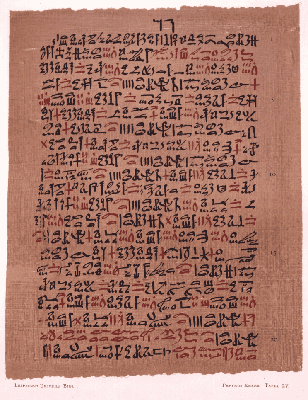
The manuscript website I chose to evaluate was "Manuscripts & Manuscript Copying Timeline". I chose this website because it has a lot of wonderful information and so many different manuscripts to look at.
My first impression of the ancient works on this webpage was nothing more than being in awe. I have always found Egypt to be an interesting place and to see some of the manuscripts that are there, being uncovered and translated has always sparked my interests. I find it so amazing that even way back in the early days people used pictures to tell their stories. As far as design elements go, I assumed that the manuscripts would not really have much design in them, but I was quite intrigued as I looked further to see that there are actually some versions of design in the earlier manuscripts.
- Contrast
- Contrast was used many times. They did not have as many colors as we do, but there were many manuscripts that used black for some words/pictures and red for other. An example is The Oldest Surgical Treatise Circa 1,600 BCE which discusses the earliest of surgical procedures. It has red text as well as black text.
- Repetition:
- When I looked at some of the early Egyptian manuscripts found, they use a lot of symbols for their words. These symbols would be repeated over and over. there are also a lot of repeated symbols on other manuscripts that I viewed. I realize that these symbols stand for certain words and are repeated to give a understanding of what is being discussed.
- Alignment:
- Many of the manuscripts use the element of alignment. In fact, for the most part the manuscripts that I viewed were each using this element. The pictures, or old script always seemed to be aligned. I do not know if they were being read left to right, right to left or top to bottom, but they definitely were in alignment. I never thought of it before, but studying these elements really made it noticeable for me.
- Proximity:
- These manuscripts almost always used the elements of proximity. Every word went with the next. Every symbol was used in a group with like symbols. There was no confusions with what went together and what did not belong.
The
authors/artists gave many examples of what the manuscripts meant and how
they are translated. They also gave us links to click on that go
further into detail about the manuscript, the author of the manuscript
and other things that were discussed in the manuscript. I was able to
learn a deeper meaning about how these manuscripts were discovered,
where they were discovered, who translated it, and what was being said
in the manuscripts.
Norman, J. (2012). Manuscripts & Manuscript
Copying Timeline. Retrieved July 7, 2012, from Jerry Norman's From Cave
Painting to the Internet. Chronological and Thematic Studies on the History of
Information and Media:
http://www.historyofinformation.com/expanded.php?category=Manuscripts+%26+Manuscript+Copying
Tuesday, July 3, 2012
5363- Course Reflection
Boy oh boy was this course a doozie. Not in a bad way though. There was so much to learn and do using technology and I loved every second of it.
Before this class started I had some experience with making videos and voice-over recordings. I had used GarageBand, and iMovie. Mostly I used them for the fun of it, creating small movies for my family or just to have for myself.
This class has really opened my eyes to so many more options and I have learned so much!
First we made a digital video over anything we wanted. I made mine over my educational journey. I chose this topic because I did not take the usual track. You can view it on previous versions of my blog. I learned a little more about how to use a different software than I had used before, Stupeflix, which I picked because I liked the name. however, I was disappointed to find out that in order to make more movies I would have to enroll friends and gain "points". Luckily I got "points" for enrolling and that gave me enough to make and share one video.
Next I made a short podcast, a tutorial about how to edit videos in Microsoft Movie maker. This was as much of a learning experience as it was a teaching one. I was able to learn about and use Creative Commons, and am so glad I know about this website. Creative commons helps you label your creations with copyright so you can upload them and share them without worrying that they will be used without your permission. My podcast was cute and quick, and it gave me some great experience on creating podcasts using Audacity.
The final and biggest project was the team video. We had to find 2-3 other classmates and spend time creating a team video. I am not the biggest fan of group work because in the past all of my groups have involved people who don't do their work and either I end up doing it or if the credit is given individually for the work each member does instead of an overall group, the end project is not good and sometimes not even complete. Well, this was different. my group was definitely full of go-getting overachievers who like to finish ahead of time as much as I di. We each had strengths and were able to combine these strengths to put together a video for students on Photosynthesis. It took a lot of work from everyine, but in the end we pulled it off...and early!!!
I can certainly see using everything I learned with my students and I look forward to seeing what they come up with. I hope to start a video library of units, using my students, that can be shared and can help mine, and other students learn.
Subscribe to:
Posts (Atom)