Wednesday, July 18, 2012

5366 - My Personal Logo


    I believe I achieved what I was looking for. Of course it is hard to know if other can look at it and see what I am trying to say. I feel that I created a heart that is colorful and gives an idea who I am. I like my name and the colors I used to express my name. I feel that the goal of showing a sweet, colorful and simple version of me is shown in the symbol.
    I used the principals of contrast with my color pallet and I used alignment by making sure everything is aligned and finally I feel that the proximity of each item is in a position that is pleasing and understandable. I also used repetition in the two sides of the heart.
    I feel that this logo shows my personality. I feel it is simple, but yet colorful and happy. Those are great ways to describe me. I am usually a very happy person. I like to lead a colorful life and I also enjoy the simple things in life. I hope that the person who sees this will feel happy and think that I feel happy too. This logo does a great job in identifying my personality.


Tuesday, July 17, 2012

5366 - Web Conference #1

July 17, 2012. 5:30 pm.
Dr. Cummings went through some of the questions that she had been receiving during the week. She discussed the first assignment, the "Teaching Tool" and then opened the floor for any other questions that might be arising.
She told us that the reflections on the ancient manuscript needs to be in the wiki but I have decided to put it in both places. It is easy, just cut/paste!
She discussed assignment 1.4 - identifying members for our group project that will be done in week 4.
She told us to divide the group to develop the pages. We will need to get our group together and think about planning for the website. She suggested we look at the assignments ahead of time to give us an idea what is coming up. She is allowing people to work outside of our section, which seemed to make others happy. So far I have nancy and Dawn and I am waiting to hear from Turkessa and Laura.
She discussed what we are going to be doing each week and emphasized that everything is to be incorporated into the web design. She said that we will probably like this course.
Dr. Cummings made sure we had her email address for any questions we may have.
DON"T PANIC - Her Montra
There were not many questions so the meeting went pretty quick.

5366 - Ancient Manuscript

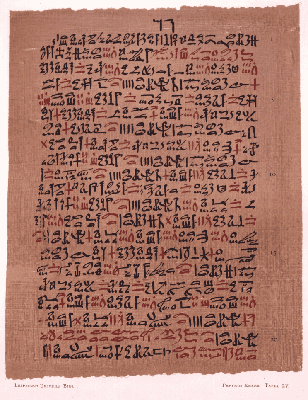
The Most Extensive Record of Ancient Egyptian Medicine

The manuscript website I chose to evaluate was
"Manuscripts & Manuscript Copying Timeline". I chose this website because it has a lot of wonderful information and so many different manuscripts to look at.
My first impression of the ancient works on this webpage was nothing more than being in awe. I have always found Egypt to be an interesting place and to see some of the manuscripts that are there, being uncovered and translated has always sparked my interests. I find it so amazing that even way back in the early days people used pictures to tell their stories. As far as design elements go, I assumed that the manuscripts would not really have much design in them, but I was quite intrigued as I looked further to see that there are actually some versions of design in the earlier manuscripts.


  • Contrast
    • Contrast was used many times. They did not have as many colors as we do, but there were many manuscripts that used black for some words/pictures and red for other. An example is The Oldest Surgical Treatise Circa 1,600 BCE which discusses the earliest of surgical procedures. It has red text as well as black text.
  • Repetition:
    • When I looked at some of the early Egyptian manuscripts found, they use a lot of symbols for their words. These symbols would be repeated over and over. there are also a lot of repeated symbols on other manuscripts that I viewed. I realize that these symbols stand for certain words and are repeated to give a understanding of what is being discussed.
  • Alignment:
    • Many of the manuscripts use the element of alignment. In fact, for the most part the manuscripts that I viewed were each using this element. The pictures, or old script always seemed to be aligned. I do not know if they were being read left to right, right to left or top to bottom, but they definitely were in alignment. I never thought of it before, but studying these elements really made it noticeable for me.
  • Proximity:
    • These manuscripts almost always used the elements of proximity. Every word went with the next. Every symbol was used in a group with like symbols. There was no confusions with what went together and what did not belong. 
The authors/artists gave many examples of what the manuscripts meant and how they are translated. They also gave us links to click on that go further into detail about the manuscript, the author of the manuscript and other things that were discussed in the manuscript. I was able to learn a deeper meaning about how these manuscripts were discovered, where they were discovered, who translated it, and what was being said in the manuscripts.

Norman, J. (2012). Manuscripts & Manuscript Copying Timeline. Retrieved July 7, 2012, from Jerry Norman's From Cave Painting to the Internet. Chronological and Thematic Studies on the History of Information and Media: http://www.historyofinformation.com/expanded.php?category=Manuscripts+%26+Manuscript+Copying

Tuesday, July 3, 2012

5363- Course Reflection

     Boy oh boy was this course a doozie. Not in a bad way though. There was so much to learn and do using technology and I loved every second of it.
Before this class started I had some experience with making videos and voice-over recordings. I had used GarageBand, and iMovie. Mostly I used them for the fun of it, creating small movies for my family or just to have for myself.
     This class has really opened my eyes to so many more options and I have learned so much!
First we made a digital video over anything we wanted. I made mine over my educational journey. I chose this topic because I did not take the usual track. You can view it on previous versions of my blog. I learned a little more about how to use a different software than I had used before, Stupeflix, which I picked because I liked the name. however, I was disappointed to find out that in order to make more movies I would have to enroll friends and gain "points". Luckily I got "points" for enrolling and that gave me enough to make and share one video.
     Next I made a short podcast, a tutorial about how to edit videos in Microsoft Movie maker. This was as much of a learning experience as it was a teaching one. I was able to learn about and use Creative Commons, and am so glad I know about this website. Creative commons helps you label your creations with copyright so you can upload them and share them without worrying that they will be used without your permission. My podcast was cute and quick, and it gave me some great experience on creating podcasts using Audacity.
     The final and biggest project was the team video. We had to find 2-3 other classmates and spend time creating a team video. I am not the biggest fan of group work because in the past all of my groups have involved people who don't do their work and either I end up doing it or if the credit is given individually for the work each member does instead of an overall group, the end project is not good and sometimes not even complete. Well, this was different. my group was definitely full of go-getting overachievers who like to finish ahead of time as much as I di. We each had strengths and were able to combine these strengths to put together a video for students on Photosynthesis. It took a lot of work from everyine, but in the end we pulled it off...and early!!!
     I can certainly see using everything I learned with my students and I look forward to seeing what they come up with. I hope to start a video library of units, using my students, that can be shared and can help mine, and other students learn.

5363 - Team Video

The ScienceQuad Team Video 
 Photosynthesis 

Monday, July 2, 2012

5363 Web Conference #4

The first thing discussed is credits given from IA and she wants to know who does not have credit for both the script and the video. There is a possibility that she cannot see the video and we are going to get full credit as long as it is given to her. She clarified that as long as we communicate with her then we will always have a chance to get the credits due. Sometimes it may be after the course is over so not to worry,. She wants us all to be successful and she will make sure we are. Especially since this is a team effort, the whole team should get the same credits. Also if we are having trouble getting email from our IA to let her know and she will make sure she takes care of it.
She clarified about the work that is turned in, just to update the work we are supposed to be doing and show the updated work on the assignment forms.
She also stressed the using the Creative Commons to ensure that we always get credit if someone uses our work. Also, don't forget the citations that are necessary for giving credit for using other people's work. 
She wants to make sure we are doing the collaboration document so that our IA and our Professor can see our collaboration with our group. My group is using google docs, which I like because we can use the google drive to pass information, photos, videos too.
Also she discussed the length of the video. She stated that she likes 90 seconds but will allow for 2 minutes. She does not want them to be too long and wants us to practice condensing them. The reason for this is for her convenience, she and the IA will have lots of videos to view. Also, to ensure that the audience keeps their interest. An audience member, especially a student does not want to sit too long to view any videos. Students must get the information quickly and be done. Plus a lot of the places that videos are uploaded only allow for very short videos.

Saturday, June 30, 2012

5363 Assignment 5.9


1.    Describe how you would implement the use of a video project with other teachers in professional development or with students in a PK-12 classroom.
a.    The video my group made was a video rap on photosynthesis. I learned so much about producing this video, and I can see how much fun it could be to make other videos for students, using the students. I can see how giving the students a starting subject and seeing what they come up with could be so much fun. The iPads that the students will have include software such as iMovie and GarageBand as well onboard cameras including video cameras. Taking that software and allowing the students to come up with videos as part of their learning process would be a great learning experience for them as well as a lot of fun.  I used YouTube as a reference for a lot of my learning. YouTube is such an amazing resource to use when learning new things. I was able to use videos from YouTube to learn how to use iMovie, MovieMaker and Audacity. I love being able to watch the videos and go step by step in my learning process. I can pause the video and try it myself, or rewind the video to see it again. Having this at your fingertips allows me learn things I never knew before. As I learned to use the different software I began to realize that this was not only fun, but so useful as far as teaching processes.

2.    Reflect  and report status upon your progress with your campus-supervised Internship activities and your action research project. How many hours have you completed? What competencies and performance indicators have you covered in this campus-based activities? What have you learned? How will you use this learning in the future?
a.    IINTERNSHIP: I have completed all of my internship activities at this point. I worked very hard with my principal and mentor to get it done by the end of the school year because there was a possibility that I would be moved to another campus and we did not want me to have to do the work somewhere else, plus it would have been difficult to keep up with my mentor and she would have had trouble keeping up with my work. I have learned so much in this process. Being an administrator is so much more than anyone who has not experienced it could imagine. There are so many aspects to consider from testing to parents to ensuring that the teachers have enough professional development. It is also interesting to see how test scores affect the school as well as the district. I was not in the dark with this information, but I was not completely aware of the depth of it all. It gives me a new and better respect for people in an administrator role and will also help me understand what is expected of me in the future. I will be able to look at reports such as the AEIS in a better way, and be able to desegregate more than just my own data but the data from the school and the district. I have also completed my internship needed for my Technology hours. This was not too difficult because I worked in the computer lab and was the campus technician at the same time. The technology side of things came easily and getting the hours done was a matter of working it in my normal school day. I enjoyed doing the hours and I gained so much knowledge from looking at the different aspects of the requirements. I was able to show teachers new and exciting ways to implement the TA-TEKS as well as giving my students some newer and fresher ideas about how to use technology.
I am relieved to be finished with my internship, but I look forward to using the knowledge I have gained in my future endeavors. I am moving out of the computer lab into a classroom this next school year and I feel this will give me a better idea how to coordinate the information I learned from the Principal Competencies s well as the Technology Standards. I look forward to using them and becoming a better, more well informed educator.
3.    What parts of your action research project have you completed? What has been successful? What would you do differently? Do you need to change some of your processes or steps to complete your research? What changes will you make if any? What steps are remaining to be completed? Is your work beneficial for your campus and in what ways is your work beneficial?
a.    I have completed the first part of my Action Research project and currently I am on hold for the final part. The first part required me to gather copy count of the last six weeks for a classroom; I chose a 2nd grade class, to compare to the copy count from a “paperless” classroom beginning in the Fall. I will probably use the second six weeks count because the first six weeks will include getting ready for the school year to begin. So for now I am on hold because we are on Summer Break.
b.    I have successfully gotten the last six-weeks copy count, a task that was easy because the teachers have their own individual accounts and they are registered on a computer in the office.
c.    If I were to do anything differently I would have done this in one school year instead of two. The reason for this is that I may not be able to use the same teacher that I chose. I wanted to obtain the copy count already so that I could begin implementing a paperless classroom as soon as possible and since we started out research in March I was able to get a quick count. Ideally I would have tried to do it in the first couple six weeks of a semester, but doing it at the end of one and the beginning of another also sounds interesting.
d.    I do not need to change any processes at this point and I can’t think of any changes I may need to make either. I am sure I will have some tweaking that needs to be done, but I am unaware of it at this point
e.    The final steps for completion are guiding the teacher to use less paper. We need to figure out what can be done in place of making copies. The teacher is going to have iPads for every student in her classroom and we need to come up with ways to use them in place of making copies. We should be able to find apps or websites that the students can access to practice spelling or math instead of doing it on paper. I have also discovered that our local library has ebooks available to the students, and many of them are AR testing books.
f.     I would say that my research is very beneficial. Since all students in the district will have either an iPad or an iPod touch, there are going to be so many ways to cut down on paper use. This benefits the school because the cost of paper is extreme. Our administrators are always telling us that the biggest expense is paper. Not only will this help our paper cost, but it will also give our copiers a break. If there are fewer copies being made then the copier will not have so much work to do. The copiers are always breaking down or needing toner. Less use could cut down on the cost of maintenance, again saving money that can be used towards the students. Also, being an example to students is something that cannot be measured, but will benefit the school, the district and in the long run the world. If students learn how to cut down on paper, why to cut down on paper and the impact it makes on the environment, they will be able to take this with them into their future and share it with others.

Works Cited

SBI. (n.d.). Video Editing Made Easy. Retrieved June 2012, from http://www.video-editing-made-easy.com/download-movie-maker.html

Siegchrist, G. (2012). Retrieved June 2012, from Learn to Edit Video With Windows Movie Maker: http://desktopvideo.about.com/od/moviemakertutorials/tp/mmtutorials.htm

tutpc. (2012). YoutTube. Retrieved June 2012, from Learn how to use Windows Movie Maker like a Pro : http://www.youtube.com/watch?v=MiVyqQmCuw8